Uptime plans
Assinging uptime plans
To assign uptime plans for the individual rooms please follow this:
Menu “Edit” -> “edit displays…”. With double-click on the desired room the new dialog will open up. In this window allows to enter name, location, seat capacity, remarks, lease price per hour and to select an uptime plan, which is already existing.
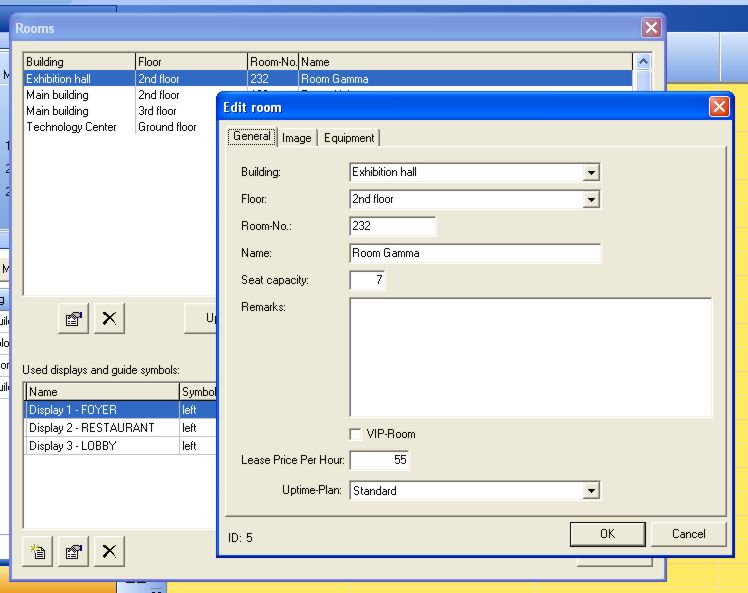
In the tab „Image“ a picture of the room can be selected as jpg or bmp. This can be either a real photography or a construction drawing. If the picture is too big for the window, it can be scrolled in all directions, so the original size will remain.
Set up and editing of uptime plans
To set-up and edit the uptime plans please follow the instructions:
Menu “Edit” -> “edit displays…” -> „uptime-plans“. Here you will find the existing uptime plans, which are editable by double-click. With the left symbol-button a new uptime plan can be set-up.
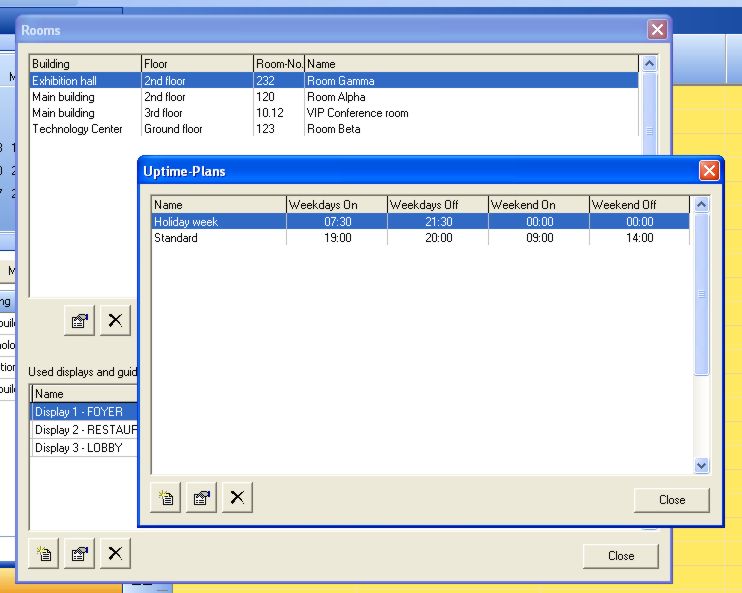
The way of proceeding is really simple: Just enter the start and ending times for the week days and the weekend days. On the tab “Exceptions” all kind of holidays and special days can be implemented.