Edit room attributes
Every single room has a number of individual choices. These, the operator can change himself. Enter the menu edit room and then choose rooms. A general layout of the single rooms will open. With a double click on one of these rooms a menu with individual information of the room will open, which can then be edited. In the file General you will see the location and seat capacity of the room. Next is the box for VIP-room. This you have to cross when the conference has a certain level of confidentiality. When crossing this box you will receive a password, which enables certain persons to access and alter information regarding the VIP-room. Only the administrator can give access authorisation. Reason for this function is the discretion regarding conference rooms for Executive Boards and General Management.
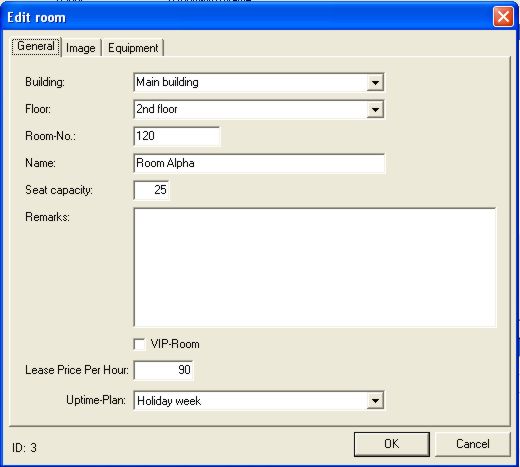
The uptime-plan refers to the hours of operation of VisDoor plates. These can be turned on and off with the program. Please note page 14. In Image you can lodge a JPG or a BMP, which can be viewed anytime by the operator.
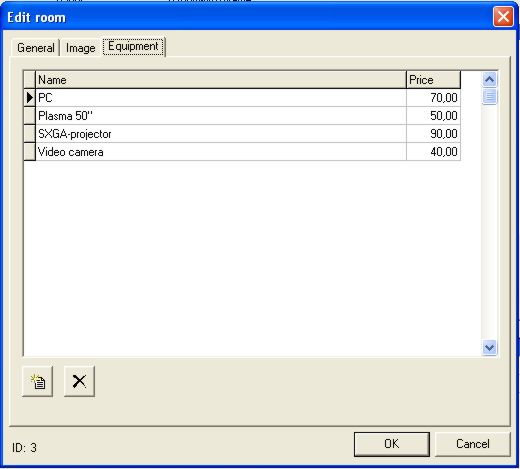
In Equipment all the technical equipment of the individual rooms can be booked. At the same time the leasing price per day can be entered. This means that the customer will immediately receive the prices with the order confirmation.
When closing this window you will be back in "Rooms". There you will find the button uptime-plan, where the exact, individual times of all the monitors are noted. In case an uptime-plan is not to your satisfaction, a new uptime-plan can be made without any problems.