Selecting Flash files
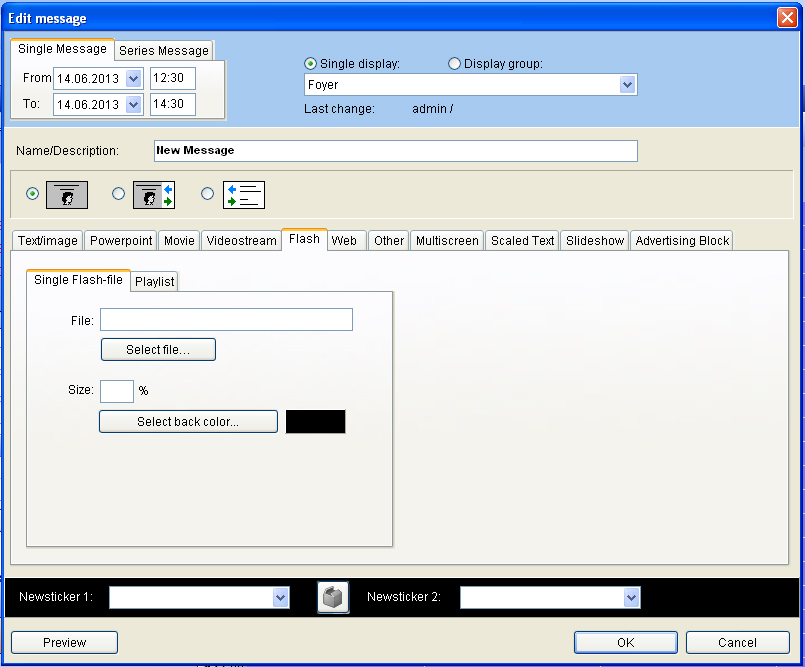
Gehen Sie wieder in das Fenster „Meldung bearbeiten“. Drücken Sie dann den Reiter „Flash“ und wählen Sie über den Button „Auswählen“ die Flash-Datei. Die Flash-Datei muss sich im Verzeichnis c:/VICOM VisGuide/Media befinden.
Open “change message” and select the flag “Flash” By pressing “Select” a dialog will open, where you can select your flash file which is in the swf-format.
Flash files are not fixed to any picture format. Since they are absolutely free, it might be necessary to scale them up or down. This can be made with the “Size” function. Flash files can handle a transparent color. Sometimes this can make irritations on the display monitor. Therefore we recommend to define a back color for swf-files. In the very new version of VisGuide a flash-list can be created from the operator. With that function several flash-files can be defined to be replayed in a list. This list can be played in a loop for hours and hours.