Copy, Move, Delete Messages
A message can be selected on the overview screen by simply clicking on it. After that, it changes its colour.
Move the cursor in the header of the window where the time is shown. By pressing the left mouse button, the window can be moved. Doing so, the time and display where it should be shown is changed. The window size can be changed (longer, shorter) by selecting the bottom left corner of the message.
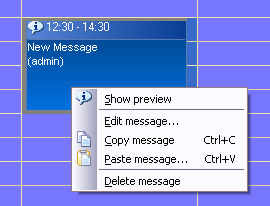
By double clicking or pressing the right mouse button the messages “copy/change/delete message”. After selectiong “change message” inputs can be edited. End the process by clicking “o.k.”