Edit booking
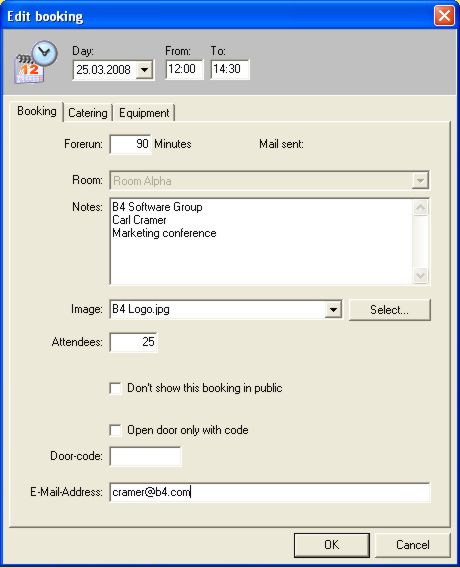
To book a conference room please proceed as follows: Highlight some features of the monitor view and then press the right mouse button. Then a new booking can be started. In the shown dialogue several entries are possible.
Optionally VICOM offers an up-grade for the programme, which gives an impulse to the door display one hour before the actual date. This impulse starts a technical device which is connected to the display. This could e.g. be a heating system or an air conditioning unit. Thus it will be guaranteed that the room temperature is perfect at the beginning of the conference.
A lead time can be entered in minutes. This refers to the preparation time of the room regarding putting up chairs, setting the tables and setting up technical equipment. When entering a preparation time of 90 min. for example, the room cannot be rented out to other customers and will be marked as occupied in the room booking overall view.
In “Notes” the name of the customer and the conference reason will be noted. Often the name of the person in charge will be noted. Please note that the dialog box “Notes” is the basis for the display on the digital door plates.
At “Image“ a JPG or BMP file can be selected, which will be also displayed on the VisDoor digital door display. The directory where the company logos are stored is \\server\booking\bookings.img. VisGuide will scale the company logos automatically to the perfect size to be displayed.
When saving the logos, it would be sensible to adapt the design to the background, which most of the times is white. This appears very professionally.
For the catering department it is very important to know the number of attendees.
The next field can be marked with a cross when the public should not know about the meeting. This means that neither on the VisDoor plates nor on the big info display monitors this meeting will be mentioned.
Please note the e-mail address of the customer in the last line. He will automatically receive an order confirmation by e-mail with all the data input, including catering and technical equipment. The description for this you will find under booking-confirmation.